When most people set up a home media server, video gets all the attention. However, your audio collection deserves the exact same premium treatment. If you have binders full of old albums gathering dust in a closet or boxes of discs in your garage, it is time to branch out. Learning how to rip CDs for a digital music library gives you a high-quality alternative to Spotify or Apple Music, all without the endless monthly subscription fees.
Expanding your Plex server to include audio makes your hardware investment even more worthwhile. It also ensures your favorite albums are never quietly removed from streaming platforms due to licensing disputes.
The Plex Server Series
Catch up on our complete guide to taking back your media collection and building the ultimate home streaming setup.
The Software Needed to Rip CDs for a Digital Music Library
Just like with DVDs and Blu-rays, you need specific software to extract audio from a disc accurately. You should avoid using standard media players like iTunes or Windows Media Player for this project. They are prone to skipping errors and introducing digital glitches.
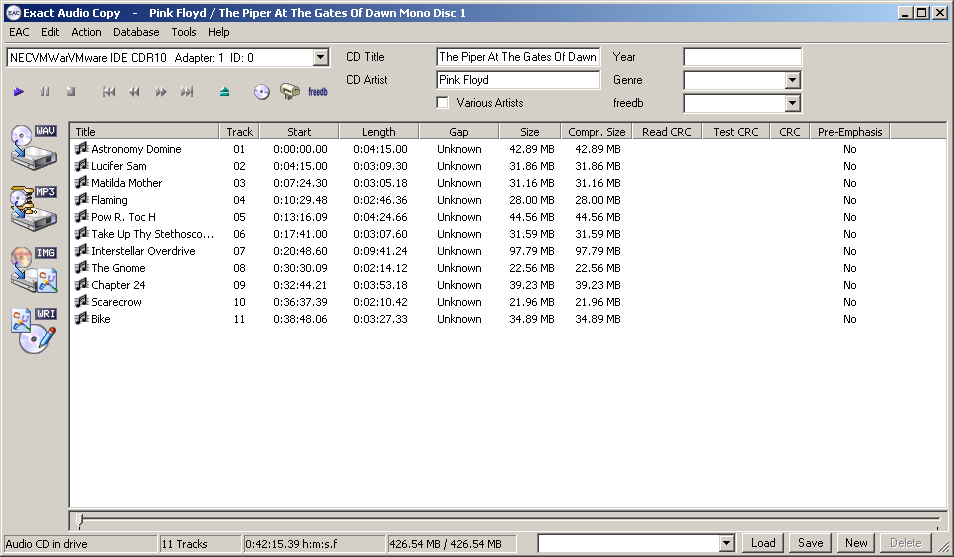
Instead, audio enthusiasts use specialized ripping software that verifies every single track against an online database to ensure a mathematically perfect copy. If you are on a Windows computer, the gold standard is a free program called Exact Audio Copy (EAC). If you are on a Mac, you will want to download XLD. Both programs take a little bit of initial setup, but they guarantee your digital files will sound flawless.
The FLAC vs. MP3 Debate
When you start digitizing your albums, you have to choose a file format. Years ago, everyone compressed their music into MP3 files to save hard drive space on their early iPods. Today, digital storage is incredibly cheap, meaning you no longer have to compromise on audio quality.
When you rip CDs for a digital music library today, you should always choose the FLAC format. FLAC stands for Free Lossless Audio Codec. It perfectly compresses the audio without discarding a single note or frequency. It provides studio-quality sound that is noticeably richer than what you get from standard streaming services. Because audio files are vastly smaller than video files, a massive FLAC library will barely make a dent in those high-capacity hard drives we recommended earlier in the series.
Metadata and Naming Conventions
Proper file organization is critical for a smooth music experience. Unlike video files, music relies heavily on embedded text data called metadata or ID3 tags. This embedded information tells Plex the name of the artist, the album title, the track number, and the release year.
Programs like EAC and XLD will automatically search the internet and embed this data into your files before they even hit your hard drive. Just make sure you arrange your actual folders logically. The standard best practice is to create an “Artist” folder, place an “Album” folder inside of it, and then drop the audio tracks inside that album folder.
Bringing It All Together in Plexamp
Once your music is organized on your server, you can stream it using the standard Plex app. However, Plex also offers a dedicated, standalone music application called Plexamp. It looks and functions just like Spotify, featuring smart playlists, gapless playback, and beautiful album art displays, all powered by your own private server.
Organizing the Chaos
Now that we have covered how to rip DVDs, Blu-rays, and CDs, you probably have a lot of files sitting on your hard drive. In Part 7 of our series, we are going to tackle the most important step for a clean library. We will cover exactly how to organize your movies and television shows so the Plex software can read them perfectly every single time.