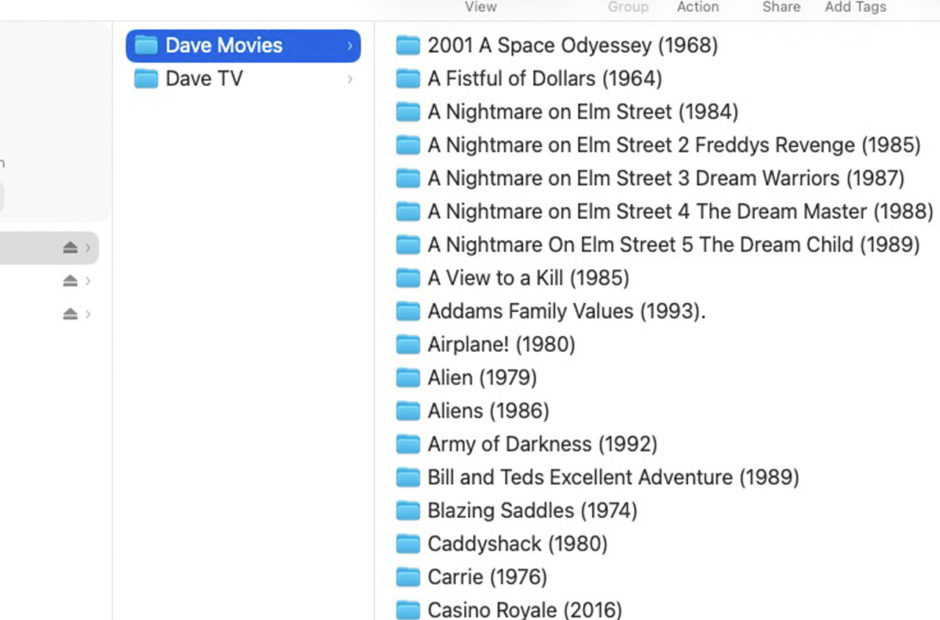
Creating a personal media server is an incredibly rewarding project, but getting your files onto a hard drive is only half the battle. If you dump hundreds of randomly named video files into a single folder, your server software will be completely confused. To get that beautiful, Netflix-style interface complete with posters and plot descriptions, you have to know exactly how to organize movies and TV shows for Plex.
Plex relies on online databases to identify your media. If your file names and folder structures do not match what those databases expect, your movies might show up with missing artwork, or worse, they might not appear in your library at all. Let us break down the exact naming conventions you need to use to keep your digital collection running flawlessly.
The Plex Server Series
Catch up on our complete guide to taking back your media collection and building the ultimate home streaming setup.
The Golden Rule of Folder Structure
Before you rename a single file, you must set up your master folders correctly. The absolute golden rule of Plex is that you can never mix different types of media in the same directory. Movies and television shows must be kept entirely separate.
On your master hard drive, you should create one folder named “Movies” and a completely separate folder named “TV Shows”. When you eventually set up the software, you will point the Plex Movie scanner at the first folder and the Plex TV scanner at the second folder. Mixing them together is guaranteed to break your library.
Naming Conventions to Organize Movies
Movies are the easiest files to manage. Plex pulls its movie data from The Movie Database (TMDB). To ensure a perfect match, you simply need to name your file with the exact title of the film followed by the year it was released in parentheses.
For example, if you rip the original Star Wars, your file should be named: Star Wars Episode IV A New Hope (1977).mp4.
If you have multiple versions of the same film, such as a Director’s Cut or a 4K version, it is best practice to place the movie inside its own dedicated folder. You name the folder exactly like the movie file. This keeps extra features and alternate versions neatly bundled together.
How to Organize TV Shows for Plex
Television shows require a much stricter hierarchy because you are dealing with multiple seasons and dozens of episodes. Plex references TheTVDB for its television metadata, so your organization must match their layout.
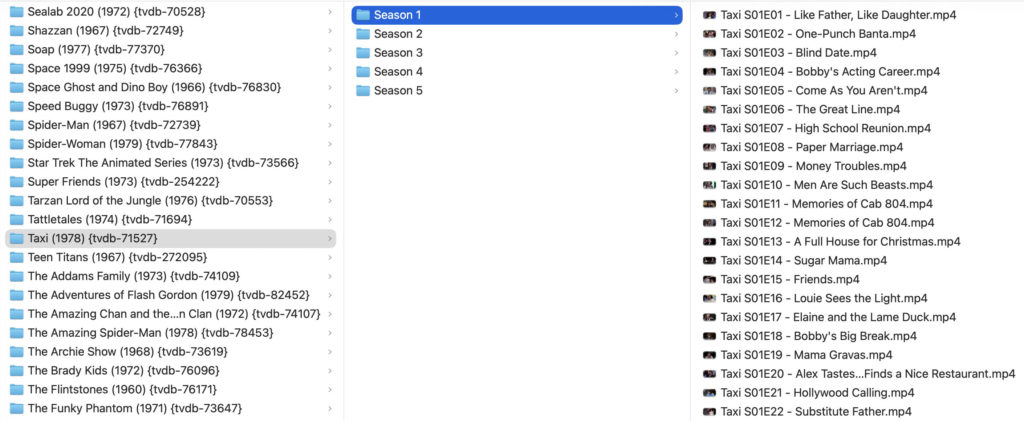
First, create a folder for the show itself. Inside that folder, create subfolders for each season named “Season 01”, “Season 02”, and so on. Finally, place your video files inside the corresponding season folder.
The files themselves must use the “S01E01” numbering format (Season 1, Episode 1). A perfect television file path looks like this:
- TV Shows > The Office (US) > Season 01 > The Office (US) – S01E01 – Pilot.mp4
Handling Specials, Cartoons, and Game Shows
Standard sitcoms are easy, but media collectors often run into trouble when they try to organize weird collections, daily game shows, or holiday specials. Here is how to handle the outliers.
Holiday Specials and Extras: Any episode that is not part of a standard season needs to go into a folder named “Season 00”. You then name the file using a zero for the season number, such as Doctor Who – S00E02 – The Christmas Invasion.mkv. You will need to check TheTVDB to see exactly which episode number is assigned to that specific special.
Daily Broadcasts and Game Shows: Shows like Jeopardy! or daily news broadcasts do not always follow standard season numbering. Instead, you organize them by the broadcast date. The format should be the four-digit year, followed by the two-digit month, and the two-digit day. For example: Jeopardy! – 2023-11-05.mp4.
Complex Cartoons and Anime: Animated shows are notorious for being broadcast in one order but released on DVD in a completely different order. If Plex is pulling the wrong episode titles for your cartoons, check TheTVDB online. You must number your files based on how the database lists them, even if it contradicts the back of your DVD box.
Automating the Process
If you have hundreds of improperly named files, renaming them by hand is a nightmare. Fortunately, you can use bulk renaming software like FileBot. This program automatically analyzes your files, checks the online databases, and renames your entire collection to Plex standards in seconds.
With your files beautifully organized, you are ready to unleash the software. In Part 8 of our series, we are going to dive into the Plex dashboard itself and reveal the best server settings for optimizing your home media library.