
If you’ve ever shopped for a DVD or Blu-ray from another country, you’ve probably encountered a warning about region codes. Depending on the disc and the player sitting under your television, that warning can mean anything from “everything will work normally” to “this disc isn’t going to play.”
Making matters more confusing, DVDs and Blu-rays don’t even use the same region system, while 4K Ultra HD Blu-rays largely do away with the problem altogether.
Fortunately, figuring out whether an imported disc will work isn’t as complicated as the collection of numbers and letters initially makes it appear. Here’s what you need to know about DVD, Blu-ray, and 4K region codes before buying your next disc.
What Are DVD and Blu-ray Region Codes?
Region codes are restrictions that allow studios and distributors to control where physical media can be played. A disc intended for one part of the world may therefore refuse to play in a player manufactured for another region.
For example, a standard DVD player sold in the United States will normally be configured for Region 1 DVDs. Put a Region 2 DVD from the United Kingdom into that player, and it generally won’t play unless the player supports that region.
There is one particularly important thing to understand before going any further: DVDs and Blu-rays use different region systems. A country can belong to one DVD region and a completely different Blu-ray region.
Japan provides a perfect example. Japan uses Region 2 for DVDs, while the United States uses Region 1. However, both Japan and the United States are in Blu-ray Region A. A Japanese DVD may therefore present a region problem for someone with a standard U.S. player, while a Japanese Region A Blu-ray may play without any region issue at all.
In other words, don’t assume a disc is incompatible simply because it was released in another country. Check the format and the region first.
What DVD and Blu-ray Region Is the United States?
For readers in the United States, the two region codes you’re most likely to need are:
- DVD: Region 1
- Blu-ray: Region A
A standard U.S. player is therefore normally designed to play Region 1 DVDs and Region A Blu-rays. Discs released without a regional restriction can also be played on compatible hardware.
Then there is 4K Ultra HD Blu-ray. Unlike DVD and standard Blu-ray, Ultra HD Blu-ray discs are region-free. A 4K UHD disc purchased overseas can therefore be played in a compatible Ultra HD Blu-ray player regardless of where the disc was purchased.
That sounds like the end of the problem, but physical media couldn’t possibly make things quite that easy. A 4K release may also include a standard Blu-ray containing the movie or bonus features, and that Blu-ray can still be region-coded. The 4K disc in the package might work perfectly while the included Blu-ray refuses to play.
For that reason, it’s still worth checking the specifications of an imported 4K release rather than assuming everything inside the case is region-free.
DVD Region Codes Explained
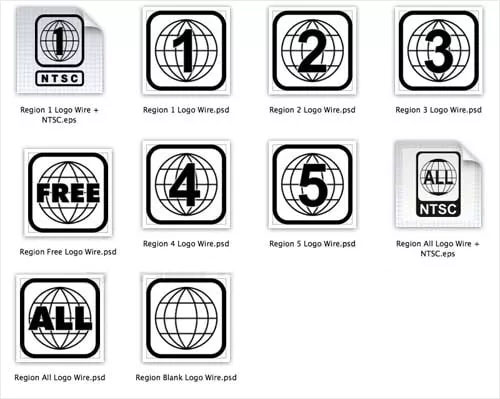
Credit: DVDFab
DVD uses a numbered region system. For most movie and television collectors, Regions 1 through 6 are the ones you’re likely to encounter, although the system also includes Regions 7 and 8.
| DVD Region | Primary Areas |
|---|---|
| Region 1 | United States, Canada, and U.S. territories |
| Region 2 | Japan, Europe, South Africa, the Middle East, and Greenland |
| Region 3 | Southeast Asia and portions of East Asia, including Hong Kong |
| Region 4 | Australia, New Zealand, Pacific Islands, Central America, Mexico, South America, and the Caribbean |
| Region 5 | Parts of Eastern Europe, the Indian subcontinent, Africa, North Korea, Mongolia, and other territories |
| Region 6 | China |
| Region 7 | Reserved for unspecified special use |
| Region 8 | Special international venues, including aircraft and ships |
You may also encounter DVDs labeled Region 0 or ALL. These discs aren’t restricted to one of the normal geographic regions and are intended to play across regions on otherwise compatible equipment.
You can usually identify a DVD’s region by looking at the disc or its packaging. The familiar DVD region symbol uses a small globe with a number inside it. A disc compatible with multiple regions can display more than one number.
For someone in the United States shopping for an imported DVD, this is the first thing to check. A Region 2 or Region 4 DVD isn’t automatically going to work simply because your player can physically accept a DVD.
Blu-ray Region Codes Explained

Credit: Wikimedia Commons
Blu-ray simplified the system considerably. Instead of the numerous DVD regions, standard Blu-ray uses three geographic regions identified by letters.
| Blu-ray Region | Primary Areas |
|---|---|
| Region A | North America, South America, Japan, South Korea, Taiwan, and portions of Southeast Asia |
| Region B | Europe, Africa, the Middle East, Australia, and New Zealand |
| Region C | China, India, Russia, and other portions of Asia |
A Blu-ray may also be compatible with more than one region. A disc enabled for Regions A, B, and C can play across all three regions and is effectively region-free for playback.
The difference between the DVD and Blu-ray maps creates some situations that aren’t immediately obvious. As mentioned earlier, the United States and Japan are in different DVD regions but the same Blu-ray region. Australia, meanwhile, is DVD Region 4 and Blu-ray Region B.
This is why simply seeing “UK import,” “Japanese import,” or “Australian import” on a store listing doesn’t tell you whether a disc will play. What matters is the region coding of that particular disc and what your player supports.
Are 4K Ultra HD Blu-rays Region-Free?
Yes. 4K Ultra HD Blu-ray discs are region-free. The A, B, and C region restrictions used by standard Blu-ray do not apply to the UHD Blu-ray format.
If you own a compatible 4K Ultra HD Blu-ray player, this makes importing 4K discs considerably easier. You don’t need to match a Region A player with a Region A UHD disc because UHD discs themselves don’t use that regional system.
However, there’s an important distinction between a region-free 4K disc and a region-free 4K player.
A 4K Ultra HD Blu-ray player may play UHD discs from anywhere while remaining restricted to Region A standard Blu-rays and Region 1 DVDs. Buying a 4K player does not automatically give you a region-free DVD and Blu-ray player.
This matters even more with combo packs. Suppose you import a release that includes a 4K UHD copy of a movie and a standard Blu-ray with the movie, bonus features, or both. The UHD disc can play without a regional restriction, while the Blu-ray sitting beside it in the same case may still be locked to Region B.
If bonus features matter to you, check the specifications for every disc in the package, not merely the 4K disc.
How Do You Find the Region Code on a DVD or Blu-ray?
The easiest place to start is the packaging. DVD region information is commonly shown by a globe symbol with the applicable region number, while Blu-ray packaging may identify the disc as Region A, B, or C.
The region information may also be printed directly on the disc.
Online retailers specializing in imported physical media frequently include region information in their product listings, which is particularly useful when you’re ordering a disc before you can inspect the packaging yourself. Still, check the listing carefully. Different editions of the same movie can have different region restrictions, so the compatibility of one release doesn’t necessarily tell you anything about another.
If the packaging or listing doesn’t clearly state the region, look for information about that specific release rather than assuming its region based solely on the country where it was sold.
Will an Imported DVD or Blu-ray Play on My Player?
You can usually answer this with four quick checks:
- Identify the format. Is it a DVD, standard Blu-ray, or 4K Ultra HD Blu-ray?
- Check the disc’s region. Look at the packaging, the disc, or a reliable listing for that specific release.
- Check what your player supports. A standard U.S. player will generally support Region 1 DVDs and Region A Blu-rays, but don’t assume this if you own a multi-region player.
- Compare the two. If the disc and player regions are compatible, the region code itself shouldn’t prevent playback.
For a 4K UHD disc, you can skip the regional comparison because the UHD format is region-free. Remember to perform the check separately for any standard Blu-rays or DVDs included in the package.
If you regularly import physical media, another option is a player that supports multiple DVD and Blu-ray regions. That can remove much of the region-code headache, although you should verify exactly what a player supports before buying it. Terms such as “region-free” and “multi-region” can be used differently in product listings, and support for multiple DVD regions does not necessarily mean support for multiple Blu-ray regions.